
The Issue Tracker is the primary issue reporting, reviewing, and updating tool in HR Case Tracker. Issue tracking is available in two locations within the product: as a panel on the Main Dashboard, and in the Issue Tracker page. Both locations are discussed below.
This Help topic contains the following information:
Who Creates Issues, and Who Can See Them?
The Main Dashboard Issue Tracker Panel
Who Creates Issues? Who Can See Them?
Issues are created in two ways:
- They can be created directly in the Issue Tracker by users within your organisation. Issues are ascribed to the person reporting, and can be reviewed and edited by the Reporter and the Reporter's Issue Manager. Issues can also be viewed or updated by any user whose role is defined as HR.
- They can be created by a call to Croner's Advice Line. That phone number, unique to each organisation, is supplied at implementation. (It is also prominently displayed at the right of the banner at the top of the HR Case Tracker screen.) Your Croner advisor creates the Issue being reported. The employee making the call is registered as the Reporter of the Issue. The Reporter's Issue Manager and anyone whose role is HR have the ability to review and update the Issue.
Note: Users who did not report an Issue, or who are not designated as the Reporter's Issue Manager or HR, will not be able to see or update the Issues created by another user.
Main Dashboard Issue Tracker Panel
The Issue Tracker panel on the Main Dashboard displays the most recent, red-flagged, and updated Issues. Each list has its own View All... button which displays the full list of Issues when clicked. Use the Create New Issue buttons to create an Issue directly from the Main Dashboard.
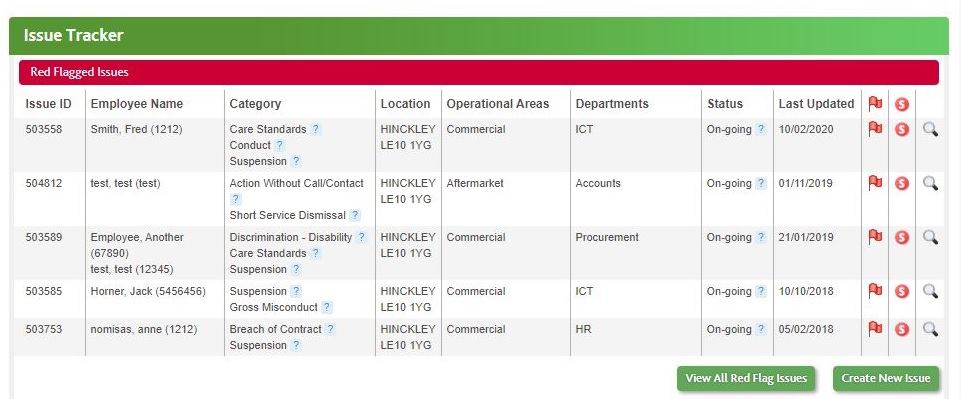
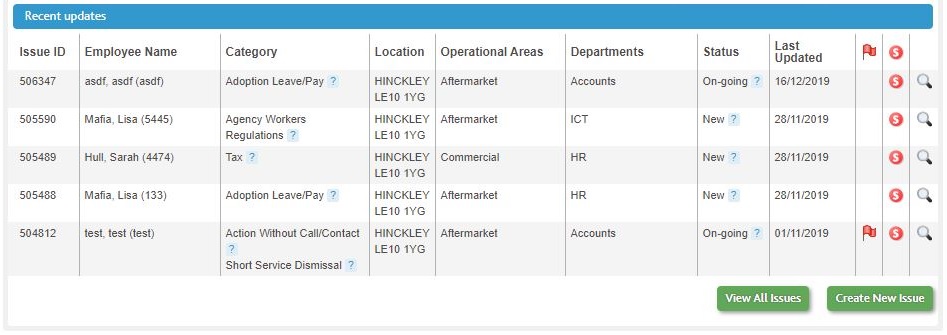
Other features of the Main Dashboard Issue Tracker panel:
- Mouse over ? icons to view advisory Tips.

- Click the
 icon for any issue to open the Issue Detail page for detailed review or updating.
Issue Tracker Page
The main Issue Tracker page provides the full suite of functions for creating and updating Issues, and also for filtering the Issue list by multiple criteria. To access the Issue Tracker from any location in HR Case Tracker, click Issue Tracker on the Main Navigation Menu.

For detailed information about using Issue Tracker, see the topics contained in this section of Help:
Comments
0 comments
Please sign in to leave a comment.